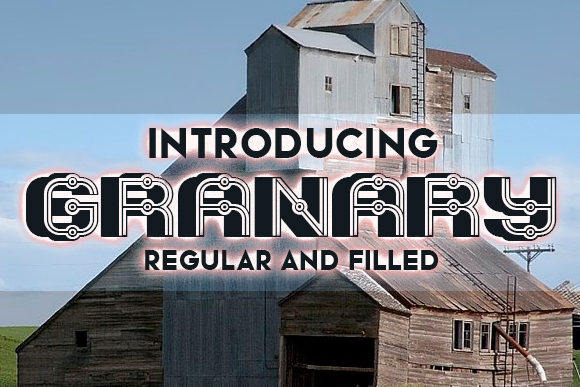
Granary
When you are looking for a typeface that commands attention without shouting, Granary often comes up in conversations among designers and creative directors. It is not just another sans-serif; it is a display font characterized by its sharp angles, clean lines, and a distinctively modern aesthetic. For professionals ranging from freelance graphic designers to small business owners launching a new brand identity, the choice of typography is rarely trivial. It sets the tone before a single word is read.
However, simply downloading a font file is only the beginning. Many creators fall into the trap of assuming that because a font looks good in isolation, it will perform equally well in complex layouts. Granary is no exception. While its visual appeal is undeniable—offering a simple yet sharp-looking presence that can truly inspire your work—using it effectively requires a nuanced understanding of its strengths and limitations. This guide aims to help you navigate those waters, ensuring that your design choices enhance rather than hinder your communication goals.
Understanding the Appeal of Granary
The primary reason designers gravitate toward Granary is its versatility within the display category. Display fonts are designed to be read at large sizes, making them ideal for headlines, posters, logos, and packaging. Granary’s geometric precision gives it a contemporary feel that works well in industries such as technology, fashion, architecture, and lifestyle branding.
Unlike serif fonts that evoke tradition or script fonts that suggest elegance, Granary speaks the language of modern minimalism. Its sharp edges create a sense of confidence and clarity. When used correctly, it can elevate a mundane layout into something that feels curated and intentional. For entrepreneurs and marketers, this means your message is perceived as more authoritative and polished. But this power comes with responsibility. The very sharpness that makes Granary striking can also make it difficult to read if misapplied.
Common Pitfalls in Using Display Fonts
One of the most frequent mistakes made when integrating a font like Granary into a project is ignoring context. Designers often download a font, slap it onto a headline, and declare victory. They fail to consider how the font interacts with the rest of the visual hierarchy. Here are some specific areas where things often go wrong:
- Overuse in Body Text: A critical error is using Granary for long paragraphs. Display fonts are optimized for impact, not readability over extended lengths. Using it for body copy creates visual fatigue and reduces comprehension. Readers may skim or abandon content that feels visually "heavy" or disjointed due to inappropriate typography.
- Poor Kerning Adjustments: Even high-quality fonts have default kerning pairs that may not suit every combination of letters. Granary’s sharp angles mean that spacing issues are more noticeable. If the space between two letters is too tight, the negative space can become jagged; if too loose, the word loses its cohesion. Failing to manually adjust kerning can make professional designs look amateurish.
- Inappropriate Color Contrast: Because Granary has thin strokes and sharp terminals, low contrast against backgrounds can cause letters to disappear or vibrate visually. This is particularly problematic for web accessibility. If your text does not meet WCAG (Web Content Accessibility Guidelines) contrast ratios, you are excluding a significant portion of your audience.
Evaluating Licensing and Usage Rights
Before you incorporate Granary into any commercial project, it is essential to understand the licensing terms associated with the font. Misunderstanding these terms can lead to legal complications, fines, or forced rebranding efforts later on. Many users assume that a free download implies unrestricted use, which is rarely the case.
Always check whether the license covers:
- Personal vs. Commercial Use: Some fonts are free for personal projects but require a paid license for anything involving revenue generation, including client work or product packaging.
- Web Embedding: If you plan to use Granary on a website via CSS @font-face, ensure the license permits web embedding. Often, desktop licenses do not automatically include web rights.
- Print Runs: Certain licenses restrict the number of physical copies printed. For small businesses producing limited-edition merchandise, this might be fine, but for larger campaigns, you may need an extended license.
Failing to verify these details can result in unexpected costs. It is always better to invest time in reviewing the end-user license agreement (EULA) upfront than to deal with cease-and-desist orders after a campaign has launched.
Strategic Pairing for Better Results
Granary shines brightest when paired with complementary typefaces. A common mistake is pairing a strong display font with another bold or decorative font, creating a chaotic visual experience. Instead, opt for simplicity. Since Granary is sharp and geometric, it pairs exceptionally well with neutral, highly readable sans-serifs or even classic serifs that provide a soft counterpoint.
For example, using Granary for headlines combined with a clean, humanist sans-serif for body text creates a balanced hierarchy. The headline grabs attention with its unique character, while the body text ensures the information is easily digestible. This approach respects the reader’s cognitive load, guiding them smoothly from interest to understanding.
Consider the medium as well. On digital screens, especially at smaller resolutions, the sharp details of Granary might render poorly if the font files are not optimized. Ensure you are using the correct file formats (such as WOFF2 for web) to maintain crispness across devices. Testing your design on multiple screen sizes is a non-negotiable step in the workflow.
Maximizing Impact Through Restraint
The most effective use of Granary often involves restraint. In a world saturated with visual noise, simplicity stands out. Rather than filling every corner of a poster with the font, use it sparingly to highlight key messages. Let white space breathe around the text. This technique draws the eye directly to what matters most.
For educators and bloggers, this means structuring your content so that Granary is used for section headers or pull quotes, reinforcing the structure of your argument without overwhelming the reader. For freelancers and agencies, it demonstrates a sophisticated understanding of typographic hierarchy, signaling to clients that you care about both aesthetics and usability.
Ultimately, Granary is a tool for inspiration, but its success depends on the skill of the user. By avoiding common pitfalls like poor kerning, inappropriate scaling, and licensing oversights, you can harness its full potential. Take the time to explore its endless possibilities, but always keep the end-user’s experience at the forefront of your decision-making process. When done right, the result is not just a pretty design, but effective communication that resonates with your audience.